
Lead management system for UAE businesses
Stop losing the leads you already paid for
Every lead from Google, Meta and your website form lands in one list and reaches your rep's phone within about thirty seconds. Each gets up to five tries in the hours you set, until it answers or says no. Built in Dubai.
By the MAJ Leads team ·
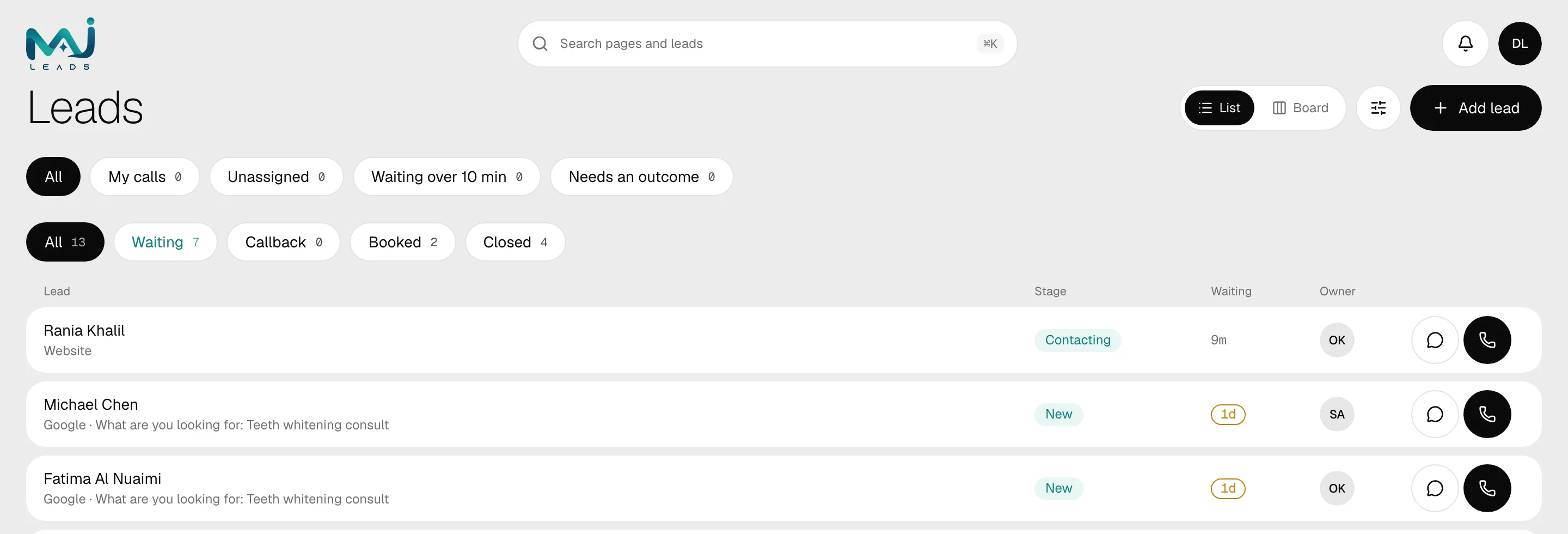
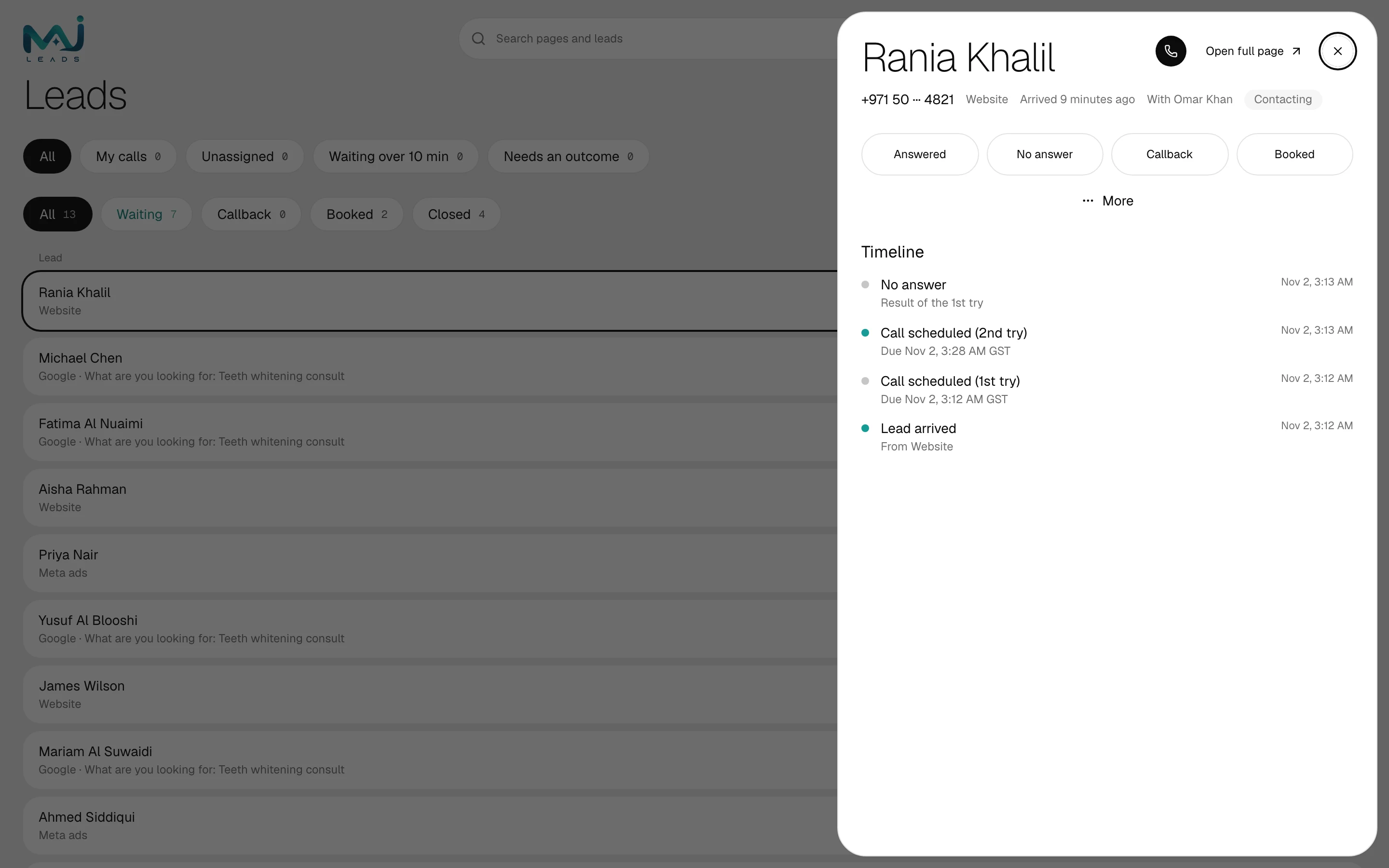
This is the console your team works in
Leads, Calls, the Dashboard and a Timeline for every lead, and your reps use the same console on their phone. These are real screens from our demo workspace, with example leads.
How it works, in four steps
From the form to a logged outcome, without anyone remembering to follow up
- 01
A lead comes in
Someone fills in your Google, Meta or website form. It lands in one inbox with the campaign attached, matched on the phone number.
- 02
Your rep's phone buzzes
Within about thirty seconds the call is due on the assigned rep's Calls list, with a push to their phone, and a WhatsApp from your own number once it is connected.
- 03
One tap logs the outcome
The rep calls, then taps Answered, No answer, Callback or Booked. No answer? The next of five tries is scheduled for them.
- 04
The outcome lands
Your CRM gets the outcome, and the Dashboard shows who is waiting and what fell through. Sending outcomes back to Google and Meta starts when sign-up opens.
Google, Meta and your website in one inbox
Connect the lead sources you already pay for. Leads are matched on the phone number, with the campaign, ad and click ID attached. A lead you add by hand or import from a CSV joins the same list.
Dental Cleaning Dubai · Same-week slots
Instagram lead form · Pearl Dental
Your contact form, one snippet
- 00:00:03
Fatima A.
Pearl Dental · Meta Lead Ads
- 00:00:09
Omar R.
Marina brokerage · Google Ads
- 00:00:14
Al Noor Trading
RFQ · Website
Example leads
A clock starts the moment a lead arrives
Up to five tries on a schedule the lead can feel, inside the opening hours you set
- 1
Now
1st try
A call due now reaches your rep's phone within about thirty seconds of the lead arriving.
- 2
+15 min
2nd try
Fifteen minutes later, for the lead who was mid-meeting the first time.
- 3
+1 hour
3rd try
An hour on, still in the same working day whenever your hours allow.
- 4
+4 hours
4th try
Four hours later, the last try before the next working day.
- 5
Next working day, 12:00
Last try
Once your number is connected, a WhatsApp message goes out: we tried to reach you. A reply reopens the clock.
Tries are scheduled only inside the opening hours you set for each weekday
Away? A rep's calls move to the next rep within about a minute
Untouched for 10 minutes: up for grabs for any available rep. At 20 minutes the owner is alerted
Leads that arrive after hours get their first try when your hours open
Capture, Chase, Compound
One engine in three parts: every lead in, every lead chased, every outcome fed back
Every lead in, on one list
Capture
Every source you pay for lands in one inbox, matched on the phone number, with the campaign and click ID attached.
- Website snippet, Meta Lead Ads and Google lead forms
- Add a lead by hand, or import a CSV
- Campaign, ad and click ID kept with each lead
- Duplicates merged on the phone number
Moves on if you're away
The follow-up engine
Chase
Your team gets each try on their Calls list and as a push on their phone, and the schedule is set for them.
- A Calls list with one-tap outcomes
- Round-robin or rules-based assignment
- Away? The call moves to the next rep within about a minute
- Untouched for 10 minutes: up for grabs. At 20: you're told
What pays back
Compound
Outcomes go to your CRM, and Analytics shows speed to first reply, contact rate and cost per qualified lead. Sending outcomes back to your ad platforms starts when sign-up opens.
- When sign-up opens: outcomes sent back to Google Ads and Meta
- New leads and outcomes sent to your CRM: HubSpot, Zoho, Zapier, Make or a Google Sheet
- Finished customers asked for a Google review
- Team performance for every rep
- Your leads and history stay yours, exportable by the owner
What happens after the call
Outcome logged
Callback · Thu 16:00Hi Fatima, we will call you back on Thursday at 4:00 pm about your cleaning at Pearl Dental.
to the lead
New lead: Fatima A. from Meta Lead Ads. Due now. Call +971 50 ··· 4821
to your rep
CRM
Conversions
once sign-up opens, so your ads can learn which leads book
- WhatsApp to the lead
- A callback confirmation or a tried-to-reach-you message, sent from your own WhatsApp number once it is connected.
- Alerts to your reps
- Each call that is due reaches the rep as a push, and on WhatsApp once your number is connected and the rep opts in.
- Calendar
- Callbacks and bookings your team logs are kept in the Calendar.
- Keep your CRM
- Every new lead and every result (booked, not interested, not reached) is sent to the tool you already use. Paste one link from HubSpot, Zoho, Zapier, Make or a Google Sheet.
- Google reviews
- Finished customers get a message asking for a Google review. Your team sends it with one tap, or it goes by WhatsApp the morning after. Automatic sending needs your WhatsApp number connected and starts when sign-up opens. Never to junk, wrong numbers or opt-outs, and once per customer.
- Back to your ads
- When sign-up opens: Booked outcomes sent back to Google Ads and Meta as conversions, so the platforms can learn which leads book.
Every lead, every try, and what is still waiting
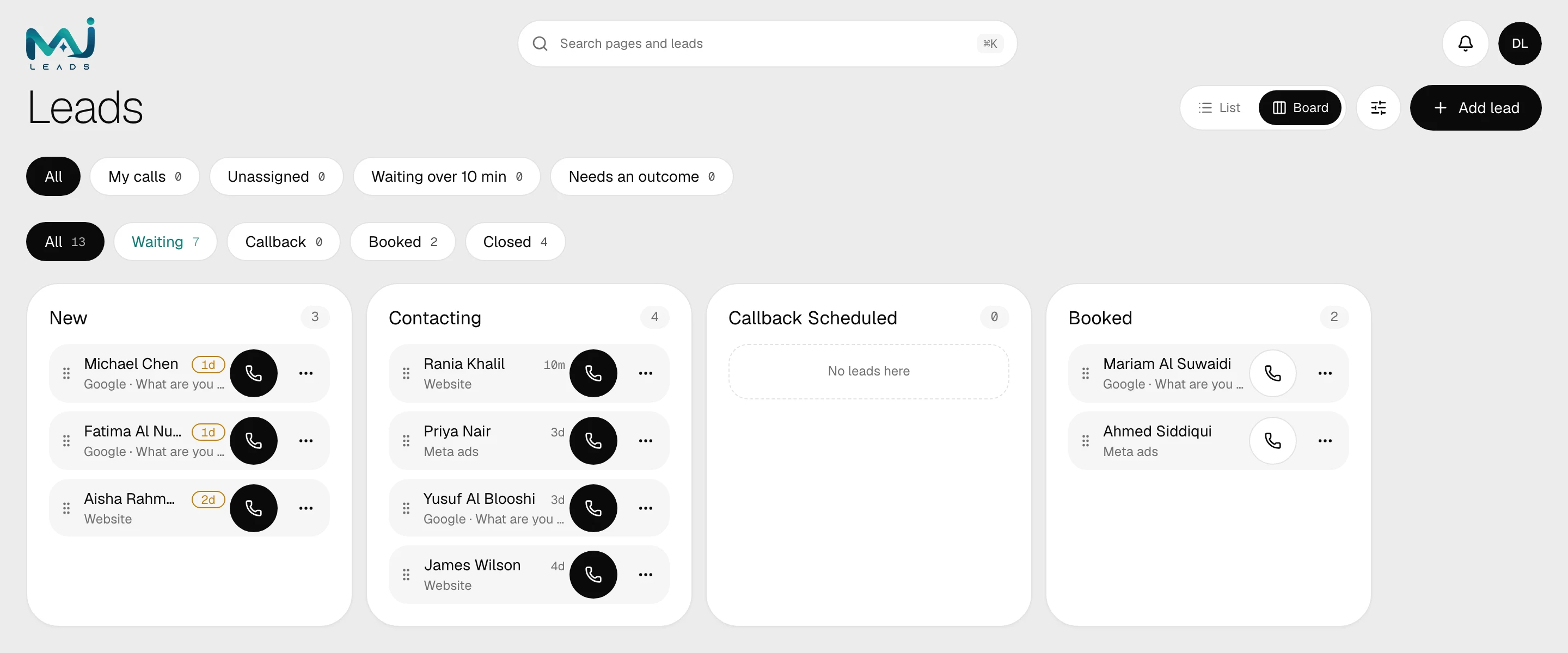
Example data: the MAJ Leads demo workspace, with made-up leads.
Yours to control, easy to audit
- Your opening hours
- Set open and closed hours for each weekday. Tries are only scheduled inside them.
- Audit trail
- Every call, message and change is in the lead's Timeline.
- Your data
- PDPL-aligned. Hosted on Supabase (AWS) with encryption at rest. The workspace owner can export every lead.
- Built for enquiries
- MAJ Leads follows up people who enquired with you. Calls to people who did not enquire fall under UAE telemarketing rules, and the product is not built for cold calling.
The cost of waiting
How much are unanswered leads costing you?
Revenue lost each month (today)
AED 237,600
AED 2,851,200 per year
Recoverable with faster follow-up / month (assumes 73%)
AED 173,448
AED 2,081,376 per year
Illustrative estimate based on the assumption above. Individual results vary.
Frequently asked questions
Your next lead is on its way. Have a rep on it in about thirty seconds
Reserve your Founding 100 spot for free and we message you first when sign-up opens. The 14-day free trial starts then. A card is needed to start. Nothing is charged for 14 days. Step-by-step guides in the app.